Showing posts with label Hardwares. Show all posts

Sunday, September 6, 2009

What's in for gamers - polishing their weapons?

When cleaning stuff goes "Cyber" geeky...
Introducing CyberClean. A "High-Tech" cleaning compound for catching dirt and killing germs.
Disinfect feature. Nice. I decided to give it a try, after all, these years of gaming have rendered my "weapons" dirty and dusty.

Some pictures galore to munch on...

Packaging and sorts.

The "Slimer" unveiled! Soft, neon yellowish, jelly-like thingy. Cute.

Before and after effects. Clean and shine...3 seconds effort, really.

The poor Slimer with dirt and crap all over.


Verdicts:
CyberClean works wonders on tight spots and tiny areas as advertised. But it DOES leave some residues (very slight) on the surface of what you pressed it on (packaging said does not leave residues). I used it on my keyboard, mouse, my phone, remote controls, gamepads...etc. They are all as clean as new now. Though it isn't that effective on keyboards where larger dust/dirt could stuck below the keys. The smell of this compound is kinda weird, like soaked with tons of IPA (Isopropyl alcohol).

Be warned not to wash this compound as it dissolves in water and it's biodegradable. Environmental friendly cleaning compound for gadget geeks. Who doesn't want some? Price ranges between RM16-30* for respective sizes.


*Yeah...a bit costly.

Wednesday, April 29, 2009

Pushing the limits...

When you possibly have the fastest gaming mouse on earth, what's more can you do to make it even faster? Things like these came into the head like crazy murmurings from outer space. Gamers like us are obsessed with speed: the faster, the better. It's a fetish. No sane being would understand why maniacs like us, like me would spend huge cash just to get faster in games. It is the gaming bloodline, the core that drives us through this. Play it to believe it. We are not only buying speed, but also deadlier accuracy, to ruin others' life in the virtual world. Gaming, just as real life, ain't fun, at least not until you are good at it. You will have to out-Skill and out-Equip your opponents by all means necessary except cheating (farkin' hate cheaters, they have no life).

Okay, back to the spotlight of today. The G9 gaming mouse by Logitech, albeit super fast with 3200DPI sensor, has a wee bit of problem. Notice the mouse feet. They are large, which translates to higher friction when moving on top of mousing surfaces (mouse pad). Though the Razer Mantis mouse mat fibertrek technology played a huge role reducing the friction to minimal, it ain't enough. I want my mouse to god damn FLY!

Original mouse feet.

Hyperglide heard me and soon they announced the Hyperglide G9 mouse skates. They called it mouse skates instead of mouse feet to imply that your mouse skates through the surface, not walking a.k.a. feet. These mouse skates are made out of smooth teflons to provide smoother movements and accuracy in games, by reducing friction between the mouse and the mouse pad. The package comes with 2 pairs of mouse skates, an alcohol swab and a simple instruction sheet.

Hyperglide mouse skates package.

First, remove the original skates/feet from the mouse. The original ones weren't bad, but I wanted more. Loved the G9 design whereby the original feet can be easily peeled off through the groove of the mouse feet frame. Then, clean the sticky glue off the surface with the alcohol swab until there's no residue left.

Feet-less G9 after having its original feet peeled.

Carefully position the Hyperglide mouse skates and stick'em into place. Apply pressure on top of the the mouse skates for at least 5 seconds to create a lasting bond. Just like love. You're done! It's that easy.

Tadaa...armed with Hyperglide mouse skates.

Performance wise, the gliding is a lot smoother compared to original mouse feet. It feels like the mouse would actually glide out of my hands! It is like flying through the mouse pad! However, care must be taken as these teflons are soft and can be easily scratched by hard particles underneath, thus destroying the smoothness, if you aren't careful. Read the maintenance tips here.

It only took me a while to adapt to this new speed and start fragging people online. It's good, it feels good, it controls good. Money paid justified. Thumbs up. Speed freak? Get this.

Thursday, January 15, 2009

Logitech G9 Laser Gaming Mouse Mini Review


For fanatic gamers, high sensitivity is never enough. Master of peripherals, Logitech heard us and introduced its ultimate laser gaming device at the end of 2007: the G9 Laser gaming mouse; after the success of its smaller brother, the G5. Logitech G9 Laser spots a whooping 3200DPI laser sensor, 1000Hz polling rate, swappable grips, MicroGear scroll wheel, on-the-fly DPI switching, custom LED colors, on-board memory for custom profiles, tiltable scroll wheel... heaps of next-gen features at your disposal. The bundled SetPoint 5.0 software lets you customize the G9 with overwhelming options. This, is my replacement of the decayed Razer Copperhead.

Technological beauty: G9 Laser on Precision Grip.


So first things first, though I've explained what's polling rate in the Copperhead review, here's the recap:

Polling Rate
It's the number of times the mouse sends reports to the computer every second.
Over USB it's normally 125Hz i.e. 125 times a second. Which means that there's a lag of 1/125th of a second or 8ms between the mouse and the system. Polling rate of 1000Hz = 1/1000 which means a lag of 1ms.


Seeing top notch gaming mice nowadays are mostly 1000Hz capable, this is a must-have feature. Note that it will consume certain amount of CPU usage. Worry not, the effect is insignificant with today's latest processors.

The Setpoint 5.0 software (look at the choices for custom LED colors!)

The G9 laser has normal left/right buttons, clickable scroll wheel capable of tilting left/right sideways, DPI increase/decrease (+/-) buttons under the LED DPI level indicator and 2 side buttons. The LED color is customizable in the Setpoint software. I prefer green as it's matching to my green Mantis Speed mousepad. Notice the braided cable, it is to reduce friction against the surface it's touching.

G9 Laser with green DPI indicator LED.


Frankly speaking, 3200DPI speed is far too high for normal first person shooter gaming. I only use up to about 2000 to 2200DPI normally. It is always good to know that you have much more "room" to go faster nonetheless (good for huge screens, too).

Under the mouse, there are MicroGear and Profile buttons. The former enables you to switch the scroll wheel between the traditional clicky mode and the free spin mode. Free spin mode is capable of spinning up to 16 seconds non-stop per flick (personal record), which is good for browsing long pages, spreadsheets and anything you can make use of. The Profile button switches between stored profiles with different mouse settings in the on-board memory.

Gaming Grade Laser capable of 3200DPI tracking.


One of the revolutionary design of the G9 laser is its interchangeable grips namely the "Wide Load" and "Precision Dry Grip". Wide Load, as its name suggests, is a smooth satin finished wide body kit with thumb rest which caters for comfort use. The Precision Grip features a slimmer, compact design for higher precision finger control mode (now we are talking!). Coated with the Logitech DryGrip technology, it prevents sweat forming on the mouse surface for better grips. I love the precision grip very much 'cos finger control is always my thingy.

Wide Load and Precision Grip.


The G9 Laser with its grip removed.


That's not all. The G9 comes with customizable weight tuning system too. There are four 4g and four 7g weights respectively. Users could add up to 28g depending on their preferences. I prefer light mouse for higher speed therefore I put none.

G9 Laser with adjustable weight balancing system.


There were no major improvements in games as I've used the Copperhead 2000DPI. The G9 is as sensitive and accurate as, if not better, than the Razer Copperhead. Been using this mouse in all FPS gamings and normal tasks for a year plus now (since launch, Oct 2007) and the buttons are still very responsive. I am very impressed with Logitech G9's robust and high quality design. Though it came with a hefty price of RM300+, with its fully packed features, 3-years warranty, it is definitely worth every single cent spent.

GAMENiAC's verdict (10 max):
Performance: 10
Built Quality: 9.5 (Minor issue: middle LED is bit dimmer than the rest. No performance hit)
Features: 10
Value for money: 8


¤¤¤ GAMENiAC's Choice: Ultimate Fragging Device Award! ¤¤¤


Interested in getting your own G9 laser? Contact me for special price! (while stocks last)


Wednesday, October 8, 2008

Piece of crap...真是烂东西!

As this is a part business trip sort of thingy, I have to borrow a company laptop for my online fix (no gaming tho...sad). So there here it is, a slow ass obsolete P4 Dell lappie with just 256MB of rams. 昏。。。 (plus lack of software maintenance by previous users; some computer idiots I presume). This piece of junk is so slow that it craps out whenever it could while I was just surfin'! If it wasn't the fact that this does not belongs to me, I would have formatted the hell out of it.

Dell crap-top.


This just makes me miss my home gamin' rig very much. If not for the Project: Lucifer upgrades, I would have extra budget for a gaming laptop instead. Oh, by the way, Lucifer is the codename for hardware upgrades for my beloved rig. Still deciding on going 45nm quads or stick with the highly overclockable duals. Stay tuned for more Lucifer updates most probably end of this year.

Home gamin' rig.


Speaking of crap-tops or junk computers, I have found some hilarious videos which I very much have the same feeling. Enjoy.


This is Sony's answer to Crapbook Air. Using the same theme song as the Apple's ad. ROFLMAO!

Monday, March 31, 2008

Say Hello to my NOT so lil' friend...Part 2

I guess it's both good and bad to say that I can't continue the lil' friend 8800GTS G92 part 2. This isn't really a part 2 anyway. The RMA progress didn't go as smooth. Supplier side said there's no stock for my Asus 8800GTS, and I was given the same amount of credit to choose anything I wanted from the shop! So there you are, behold! The Gigabyte 9800GTX 512MB (with a little bit of top ups)!

This monstrous card was pushed back to launch on 1st of April (not a joke). Due to its tri-way SLI drivers haven't been optimized. I got this pre-launched! Even Gigabyte driver CD mentioned this card wasn't supported. I was like WTF?! The ultimate permission to brag! *evil laugh*...

Gigabyte 9800GTX G92 512MB.

If you think 8800GTS G92 is huge. Wait till you see this card. If 8800GTS is a monster, this is the mother of all monsters! Almost an inch longer than my previous GTS, hardly manage to squeeze it into my casing. THIS IS NOT YOUR LIL FRIEND!!! It is huge...Note that if you have a smaller casing.

The lil white stuff on the top left of the bracket is a LED.
Red means not enough power and no boot. Gotta have it green!

Given the same specs as the 8800GTS G92, this card should perform on par, if not better. It takes 2 six pins PCIe power inputs now. No official specs as of yet, not before the NDA has been lifted. This card operates cooler than its brother, and utilizes Samsung Vrams as opposed to old Qimonda. That's a bonus for overclockers!

No idea what's the lil 2 pin socket on the right pic does.
No official words yet. Guessed it serves some sort of fan monitor purpose.

Big butt this card has. The design of the cooler is more "stream-lined" like a sports car.

Haven't stressed this card yet. Ran 3dmark06 and COD4. Performances were a bit lower compared to 8800GTS G92. This could be due to the fact of immaturity of the drivers. Hopefully there's a fully working driver after the launch, to unleash its hidden powers. Till then, stay tuned.
By the way, pictures taken using Sony Ericsson P1i. Not bad huh? *grin*...

Monday, March 3, 2008

Say Hello to my little friend...Part I

Got this on last year's 24th Dec. It's X'mas eve! Though not celebrating one, I've squeezed my way through the traffic jams, and not forgetting those last-minute-x'mas-shopping-idiots (hey, me excluded, ok?). Grabbed my stuff, happily hugging it (with much love), paraded around the area for some time, showing off my "precious". Gone through at least 45 mins of traffic and idiot jams again, finally I was back to my command center. Whew...what a fruitful day! Well, sort of.

Asus 8800GTS G92 512MB Packaging

I now present you, the Asus 8800GTS G92 512MB! All hail the king of G92!!! With 65nm technology, 128 Stream processors that come close in terms of performance with its big bro 8800GTX, with a far, lower price. Smaller die size is always good once the technology matures, which means lower heat, lower power consumptions and lower price! The breakthrough of these G92 architectures produced the 8800GT and GTS series that would surely send ATI graphics card to hell (for the moment, though. There's never ending war in graphics technology.). That has led me to switch from ATI camp to Nvidia.

Close-up of the card. Nice fan with efficient cooling and low noise.

This upgrading thought came soon after my Call of Duty 4 ran below 60FPS (frames per sec.) with every settings & details max on the ATI X1900XT 512MB. The frame rates in first person shooter games play a vital role, especially if you are playing online competitively.

ATI X1900XT VS Nvidia 8800GTS G92

This card is long, even tad longer than my already huge X1900XT. People with smaller casings would have problems installing this monster. My DFI NF4 board just got all the SATA ports blocked by this huge behemoth if I wanted to install it in the 16x PCIe lane. Great. What an ingenious design from DFI team...NOT! I'll have to install the card on the lower 8x PCIe slot since I needed those SATA II ports. This would affect gaming performance, though not by much. It will be shown later in part II with real world game benchmarkings.

Nice GeForce emblem eh? Remember not to touch the silver part while gaming. It gets freakin' hot!!!

It is a beauty of technology. And performance wise, it delivers as promised. Boosting my COD4 frame rates of 60+ max on previous x1900xt to an average of 80-100+ FPS with every graphical settings to max (with AA off though. Who needs AA on 1680x1050 resolution? *grin*). Remember this phrase of wisdom always: the higher the FPS, the more advantages you'll have in games. Seriously, for performance freaks, this is the main reason why you should put the money where your mouth is. With its two slots cooling system, it is very efficient by keeping both the temperature and noise low. Even the fan speed is set to 60% in Asus smart doctor, the noise are still acceptable, as contrary to single slot cooling solution found on 8800GT.

Left: 8800GTS backside. Right: Installed and running.

To be continued in Part II with some benchmarkings on X1900XT vs 8800GTS and difference between 16X PCIe vs 8X PCIe vs 2X PCIe speeds. Stay tuned.

Oh, on a side note, this card is currently in the RMA process. Crap. No games for me for at least a month! Poor RMA system we have in this country. Anyways, suspected the Qimonda Vram was not very reliable. I've encountered regular freezes and artifacts in games. Hmmm...

Monday, December 3, 2007

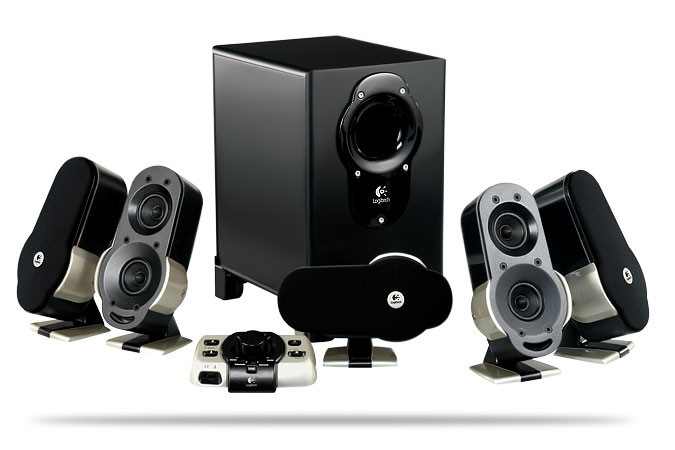
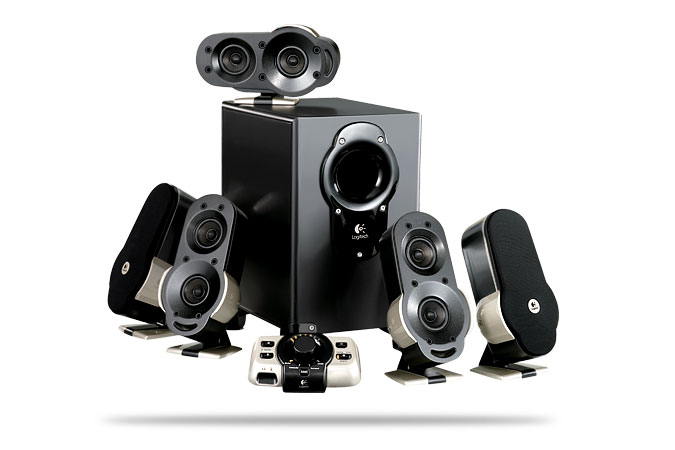
New Logitech G51 Surround Sound Speaker System

Logitech has recently extended the evil claws of G-series gaming peripherals toward the audio division. Debuted its G51 5.1 surround sound gaming speaker system tailored especially for gamers. (so, yay?)

With total RMS of 155 watts, 5 channels of satellites (20w X 4, 19w for center) and a hefty sub with 56 watts. FDD2 sound technology capable of producing whachamacallit uniform soundfield anywhere in the room (direct quote from Logi). The system sure looks promising on paper specs. I've gone through several foreign reviews and the remarks are good, if not better than its predecessor, the X-540. It is perfect in games and movies though lacking details in music (muddy bass). I admit I'm not those audio heads with sensitive ears, thus, this system should do just fine.


The SRP is kinda steep, asking for RM900+ over a mid range speaker system. Seeing they only priced around USD199 or cheaper in the States, it is obviously overpriced here.


I've been "hearing" under the rocks and have been using my faithful old Altec Lansing ACS45.1 2.1 speaker system for the past 5 years. As uncle Yoda once said, "Go surround, gamers must!". Yeah, speaking of games immersion, unless I wanna get my arse backstabbed again in Call of Duty 4 (by not hearing what's behind), and considering the G51's big bro Z5500 costs double, I'm looking forward to this system, when the price is reasonable. Less than RM800 perhaps? USD to RM conversion. Meh.

Tuesday, October 2, 2007

Razer Copperhead - Gaming Mouse Review

Quoted from Razerzone:
"Equipped with speed, precision and sensitivity,
the Razer Copperhead™ brings gaming to new heights with
its revolutionary 2000dpi laser sensor technology.

Add 32KB of onboard memory,
this intelligent mouse is a genre-defining weapon that makes for
penetrating, explosive gameplay."


Razer Copperhead on Razer Mantis Speed


Still using the typical mouse for gaming? I used to, too. I was using a cheapo A4Tech optical mouse, then switched to Creative Optical 3000 800DPI mouse. But it still wasn't fast enough for my daily Counter Strike: Source dosage. Plus, often, the opponents seemed to be able to trigger or zoom faster than I did. I've tried to master the extreme lightning clicking speeds from the village of lightspeed, but to no avail. I was puzzled, so I prayed. So I prayed...to God? Ha! You bet. Yeah right, my almighty god, the gaming device manufacturers!

Creative Optical 3000
At last, my prayers were answered (not all, though) when I came across this fast laser mouse with ultimate precision, the Copperhead. Named after a poisonous snake from Razer, a company known for producing gaming peripherals. The design is ambidextrous, therefore, it is friendly to both lefties and righties.

The mouse design is in such a way that encourages finger control over the traditional "palm-style" control. Meaning you hold and control the mouse with your fingers only instead of laying your whole palm on top of the hull. The perfect curve for finger control will prevent RSI for prolonged usage. I've gamed for more than average of 5 hours per day without feeling any discomfort, as contrary to my Creative 3000, traditional Logitech and other humpback kidney designed mouse.

Razer Copperhead Chaos Green on Razer Mantis Speed mouse mat.
Do we actually need 2000DPI (dots per inch)? The answer is Yes, if you are a high sensitivity gamer (even low sens gamers could reduce the on-the-fly sensitivity and DPI to desired settings) and have a large monitor. A single swipe of your palm will have the mouse pointer reaches left or right easily, as opposed to lower DPI mice where you need to swing left/right, lift up, left/right a couple of times. This is very important in games, especially FPSs (First Person Shooter). Meaning, you are able to look around the environment faster than your enemies, given that they aren't using the same or higher DPI mice (this excludes those low sens swiping freaks, pro or noobs of the like).
Razer Copperhead Front

The Copperhead has 7 buttons altogether. The main left/right buttons, the scroll button, and 2 side buttons on each left and right of the mouse. All the buttons could be set as Macro or assign to other functions. For me, I've only used one of the buttons as on-the-fly sensitivity adjustment. There're a lot of options you could customize in the Razer's advanced driver control which also known as the Razer Synapse Configurator. From polling rates, DPI, windows sensitivity, acceleration to button macros and flashing your firmware.
Copperhead Driver Control (Synapse Configurator)

What's the polling rate anyway? It is the rate at which the mouse sends signals to computer every second. The higher the polling rate, the faster the computer responses to your clicks and movements. The Copperhead is capable of 1000Hz which means 1ms polling rate, as opposed to typical mouse of 125Hz over the USB port. Be warned however, setting the polling rate to 1000Hz requires a little bit of processing power from the CPU. So those with slower CPU cores should consider setting on 500Hz instead. Users reported that they could spot the difference between 125Hz (8ms) to 500Hz (2ms), but there's not much difference between 500hz to 1kHz.

The "On-the_Fly" sensitivity adjustment is a lovely addition, where you could virtually adjust the sensitivity in real time, eg. in games by just pressing a button which you assigned as "on-the-fly" and scroll the wheel up/down to set the sensitivity up/down and vice versa.

On the fly sensitivity status bar will appear on the bottom right of your screen.

A sensitivity level status bar would appear on screen once you triggered the on-the-fly function, showing your current sens level, even in games (if users checked the option in the synapse software). This feature enables me to adjust to the nature of weapons used in games. For example, if I'm sniping off fast moving opponents with a scoped view, I would set my sens higher. Whereas I would lower the sens for high recoil rifles like the AK-47 to compensate for the gun back-kick, which could seriously screw your aim and emptied your clips into the walls and birds (if there're any) instead of your enemies.

Users could adjust the DPI on the fly too, but I prefer to fix it at 2000DPI, as the tracking would be more accurate with higher DPI values. Altering the on-the-fly sensitivity, simply means changing the sens by software/driver offset without nerfing the tracking sensor itself.

Okay, Enough for the DPI tech talks. Accuracy and speed are crucial in games like Counter Strike, the same goes with all FPS games. With the mentioned high sensitivity tracking, I could target/aim opponents faster with minimal finger/palm movements. Granted with the Hyperesponse buttons trademarked from Razer, I find myself able to trigger or zoom faster than before. The results is, of course, higher frag rates. No kidding. The precision from the Class 1 Eye Safe laser sensor is amazing and dead accurate. Even it was noted "eyes-safe" I wouldn't recommend staring at the laser when the mouse is powered on.

Tiny mouse feet, the laser sensor and profile button.

The 32k on board memory can store up to 5 profiles where users could switch between by pressing the profile button at the bottom of the mouse. This is handy when gamers using their own mouse in tournaments where there's no driver installed. All the polling rate, sensitivity and button mappings are stored in the memory.

There're also cosmetic features on this Coppherhead, which includes the blinking razer 3 snakes logo on the back of the shell, which imitates the breathing of a living snake. The Razer Glowpipe non slip side rails which enhances the grip and also illuminates the surroundings, thus gamers could find their mouse in the dark. The scroll wheel has a bright glow too. The copperhead has 3 colors to choose from: Chaos Green, Anarchy Red and Tempest Blue. I chose Green because it is cooler with that acidic look and to match my Razer Mantis mouse mat.

Three colors to choose from: Chaos Green, Anarchy Red & Tempest Blue.


Final Thoughts:

Is this mouse worth your money? Definitely, the copperhead has every aspects an avid gamer would wish to be imbued in a mouse. BUT, yes a big BUT, the Copperhead is not without its problems. Do a quick google and you may discover that a lot of end users complained about the double clicking issues: the button double clicks when you actually did a single click.

Sadly, my Copperhead is inherited with the problem too, even before a year of use. Now both the left and right button double clicks! This is a nightmare for us, FPS gamers, where it made our single shot became double shot and wasted the ammunition (this might be good for run and gun games without recoil). Or worse, became un-scoped where we usually zoom with a single click (double click made the zoom mode became un-zoomed). In windows, it could lead to frustrations since single clicking/highlighting a folder actually opens it or open the item inside, because windows thought you are double clicking!

For the hefty price tag of sub RM200+ in the market, I expected the mouse to be able to withstand my button bashings and longer lasting. It is dissapointing for a great mouse. Apart from a bunch of useful functions, some are just pure marketing gimmicks, where we won't use daily or never will.

Hope Razer could at least improve their QC, maybe just replace the microswitches which powered the mouse buttons. A precise, fast and egornomic mouse hampered by a huge double clicking problem is not worth it.

I'm looking forward to send the Copperhead for RMA. During this period, I might just get myself another gaming mouse...err...from Razer? Hell NO! I have the phobia already. It's going to be the Logitech G9! Stay Tuned till the next mouse updates!